
Installation
install and run each of the four apps.
Each app is its own project with its own folder. Run the commands from that folder. The phone apps need a real phone with NFC to read cards; Card Studio runs without a reader in simulated mode.
01Check your tools
flutter --version      # 3.41 or newer
flutter doctor         # fix anything red for iOS or Android
python3 --version      # 3.10 or newer, for Card Studio
See Requirements if something is missing.
02NFC Crypto (apps/nfc_crypto)
- Open the folder.
cd apps/nfc_crypto - Create your settings file.
cp .env.example .env. Every value in it is optional; the app runs with the file as it is. See Configuration. - Get the packages.
flutter pub get - Connect a phone with NFC (USB, or wireless debugging). For iOS, set your Apple team first (next section).
- Run.
flutter run --dart-define-from-file=.env
cd apps/nfc_crypto
cp .env.example .env
flutter pub get
flutter run --dart-define-from-file=.env
The first screen lets you create a new wallet or import one. Then open the Card tab to pair a card. On a simulator or emulator the card screens open, but no card can be read.
03Set your Apple team (iOS)
The projects ship without an Apple team. Before you run on an iPhone, set yours in one of two ways:
- NFC Crypto and CryptoCard Wallet: in
ios/Flutter/, createSigning.local.xcconfigwith one line,DEVELOPMENT_TEAM = YOUR_TEAM_ID(your 10-character Team ID from developer.apple.com → Account → Membership details).Debug.xcconfigandRelease.xcconfigread this file when it exists, and git ignores it. CryptoCard has a ready template: inios/Flutter/runcp Signing.example.xcconfig Signing.local.xcconfig, then remove the//in front of the settings.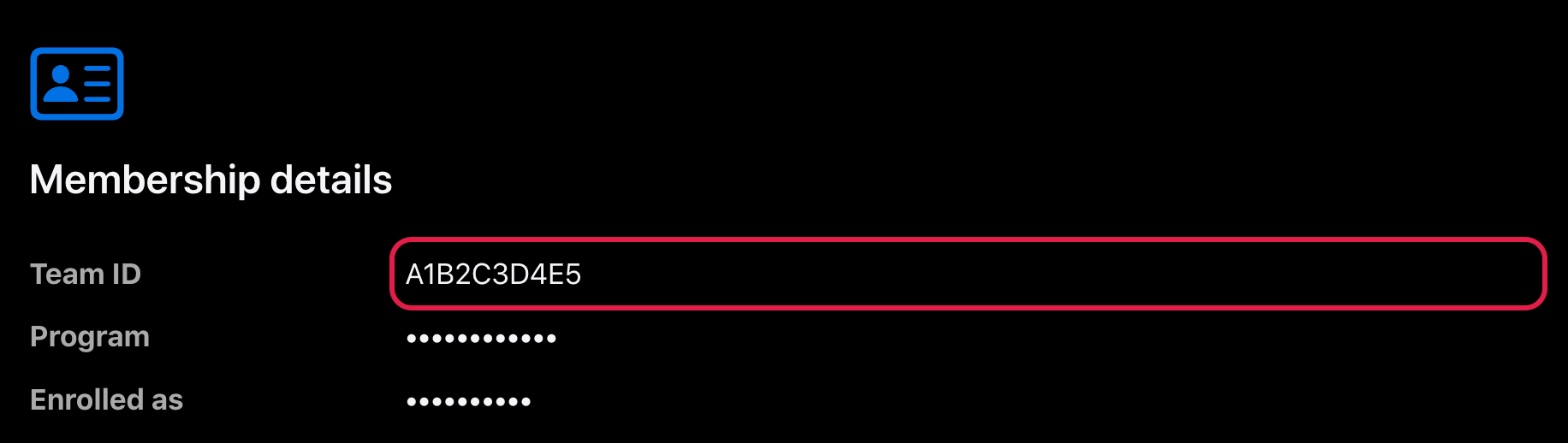
developer.apple.com → Account → Membership details. The Team ID in this screenshot is a sample value; other fields are masked. - Any app, including NFC Recovery: open
ios/Runner.xcworkspacein Xcode → Runner target → Signing & Capabilities → choose your team.
Your App ID needs the NFC Tag Reading capability. NFC Crypto and CryptoCard Wallet also need Associated Domains (for card taps that open the app). With automatic signing, Xcode adds them from the entitlements files.
04CryptoCard Wallet (apps/cryptocard_wallet)
cd apps/cryptocard_wallet
flutter pub get
flutter run
No settings file is needed. A new install starts on the Sepolia test network (and Solana Devnet for Solana), so nothing of value moves until the user switches network on purpose (defaultNetworkId in lib/brand/brand_config.dart). Free test coins come from any Sepolia faucet and from faucet.solana.com.
The card host can be changed per build with --dart-define=CARD_HOST=cards.example.com. See White label.
05NFC Recovery (apps/nfc_recovery)
cd apps/nfc_recovery
flutter pub get
flutter run
The app only reads cards. It needs no settings file and no internet. Set your Apple team in Xcode before running on an iPhone.
06Card Studio (apps/card_studio)
macOS:
cd apps/card_studio
./run.sh              # with an ACR122U reader plugged in
./run.sh --simulate   # without a reader
Windows: double-click run.bat. In PowerShell you can use .\run.ps1; if Windows says running scripts is disabled, run powershell -ExecutionPolicy Bypass -File .\run.ps1.
The first start takes about a minute: the launcher creates a private Python environment (.venv) next to the app and installs argon2-cffi, cryptography and pyscard. Later starts are quick. If pyscard cannot be installed, the studio still starts and the simulated reader works; delete .venv/pyscard-skipped to try the install again.
The studio opens in your default browser. The terminal prints the address, for example http://127.0.0.1:57551/#…. Keep the terminal window open while you work; Ctrl+C quits.
| Option | What it does |
|---|---|
--simulate | Simulated reader for this launch only |
--browser | Always open in the browser |
--no-browser | Only print the address |
--port N | Use a fixed port (default: a free port) |
--data-dir PATH | Keep the database in another folder |
--config FILE | Use a white-label config file. See Card Studio white label. |
Optional native window: install pywebview into the studio's environment (.venv/bin/pip install pywebview, on Windows .venv\Scripts\pip install pywebview).
07Run the tests (optional)
| App | Command (from the app folder) |
|---|---|
| NFC Crypto | flutter analyze, flutter test, python3 tool/nfc/test_nfccard.py -v |
| CryptoCard Wallet | flutter analyze, flutter test --timeout 180s |
| NFC Recovery | flutter test |
| Card Studio | macOS: .venv/bin/python -m unittest discover -s tests -vWindows: .venv\Scripts\python -m unittest discover -s tests -v |
The tests need no phone, card or reader. They use simulated cards.