
NFC Crypto Kit
four apps for your own crypto card.
Everything you need to install, brand and ship the kit: a wallet that a card confirms, a wallet that lives on the card, a recovery app, and a desktop studio that writes the cards. Read it top to bottom the first time. After that, press / and search.
01What you bought
AI tools were used to assist with parts of the code, documentation and graphics of this item. The author directed the work and reviewed the code before release. What was checked for version 1.0.0, with Flutter 3.41.4 on macOS: flutter analyze reports no issues in the three phone apps; the automated tests pass (NFC Crypto 979, CryptoCard Wallet 134, NFC Recovery 29, NFC Crypto desk tool 21 with 4 skipped, Card Studio 95), and Card Studio was started with its simulated reader and sample data. These are unit, widget and simulator tests. Pairing a card, opening the app, confirming a payment and the phrase backup were also tested with real NFC cards. Card roles, spending limits and tap to pay are covered by the automated tests only: test your build with real cards before you sell (checklist).
The kit lets you launch your own branded NFC crypto card. It has four apps that share one card format:
| App | Who uses it | What it does |
|---|---|---|
NFC Cryptoapps/nfc_cryptoFlutter, iOS and Android | Your customers | A self-custody wallet for EVM networks, Solana and Bitcoin. The phone holds the keys. A paired card opens the app and confirms payments, has a role (Owner, Backup or Spender), can carry a PIN-encrypted backup of the recovery phrase and the owner's receive addresses for tap to pay. |
CryptoCard Walletapps/cryptocard_walletFlutter, iOS and Android | Your customers | The card is the wallet: the PIN-encrypted phrase lives only on the card and the phone is watch-only. Tap and PIN to send. Backup cards, roles and limits. Starts on test networks. |
NFC Recoveryapps/nfc_recoveryFlutter, iOS and Android | Your customers | Offline and read-only: tap a card, enter its PIN, read the recovery words. Never writes to a card, never stores the words. |
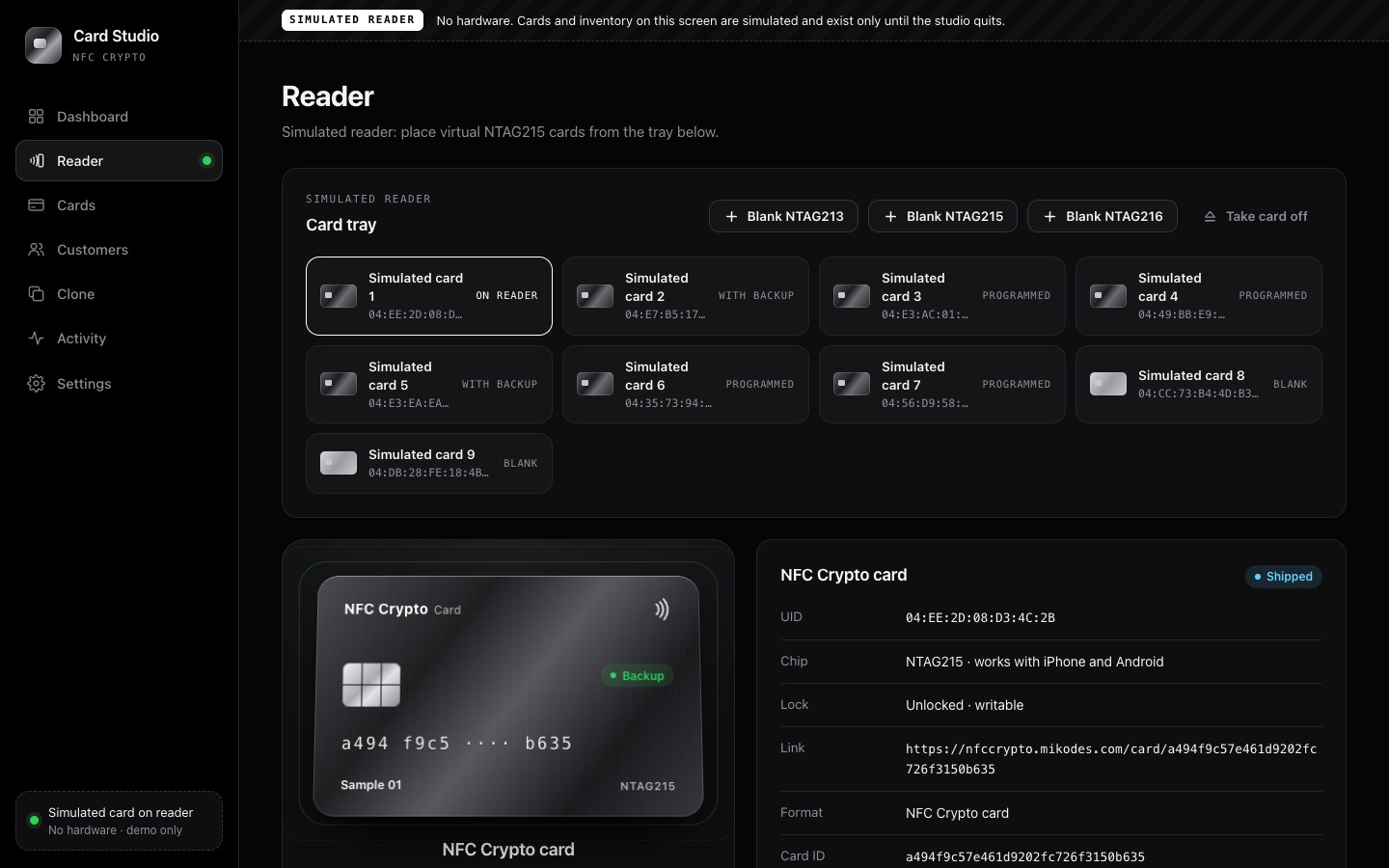
Card Studioapps/card_studioPython, macOS and Windows | Your team | Programs, batch-programs, clones, checks, erases, assigns and ships cards with an ACR122U reader. Has a simulated reader for training and demos. |
See the phone apps in the live demo: nfccrypto-demo.mikodes.com (sample data, simulated card taps).
02What is in the ZIP
apps/
  nfc_crypto/          NFC Crypto (Flutter)
    lib/brand/           white-label config
    lib/core/nfc/        card link, backup, addresses, roles, limits, signing guard
    docs/nfc/            card protocol notes and the card-host files (hosting/)
    tool/nfc/            nfccard desk tool for the ACR122U
    .env.example         build-time keys
  cryptocard_wallet/   CryptoCard Wallet (Flutter)
    docs/hosting/        card-host files for CryptoCard
  nfc_recovery/        NFC Recovery (Flutter)
  card_studio/         Card Studio (Python)
    run.sh run.bat run.ps1
documentation/         this documentation (open index.html)
Each app folder has its own README and tests.
03How the pieces fit
- You buy blank cards (NTAG215 or NTAG216).
- Your team programs them in Card Studio: each card gets a random ID and a link to your domain. You assign cards to customers and ship them.
- The customer pairs the card in NFC Crypto, turns on "Require the card", and can save the recovery backup and receive addresses on it. Or the customer creates a wallet on the card with CryptoCard Wallet.
- Tapping the card opens your app (through your domain on iPhone) and confirms payments.
- If the phone is lost, NFC Recovery or the wallet's "Restore from NFC card" reads the backup with the card's PIN.
04What the kit is not
- Not a hardware wallet. NTAG cards can be copied by whoever holds them (Security).
- Not custodial. There is no server and no account system; you never hold user funds.
- Not a payment processor or card issuer. There is no fiat, no card network and no checkout.
- Spending limits are app rules on one phone, not on-chain rules (details).